Measurements and Annotations
Within the Omnibase measurement menu, measurements can be performed easily and all available data sources within a project can be used. The order in which the measurement is performed does not matter: you can switch at any time to another data source of the same datatype or a different datatype. The measurements are visible in all data sources and all opened split screens, enabling immediate control and quality assurance.
Below is an example of a set of drone images including a point cloud generated from the drone images:
The left screen is in 3D mode and a second image screen is opened. Within the image screen, a measurement is performed using two side images (see the two right image views). The measurement is immediately and in real time visible in the 3D screen, allowing the object and the measurement to be viewed from various angles.
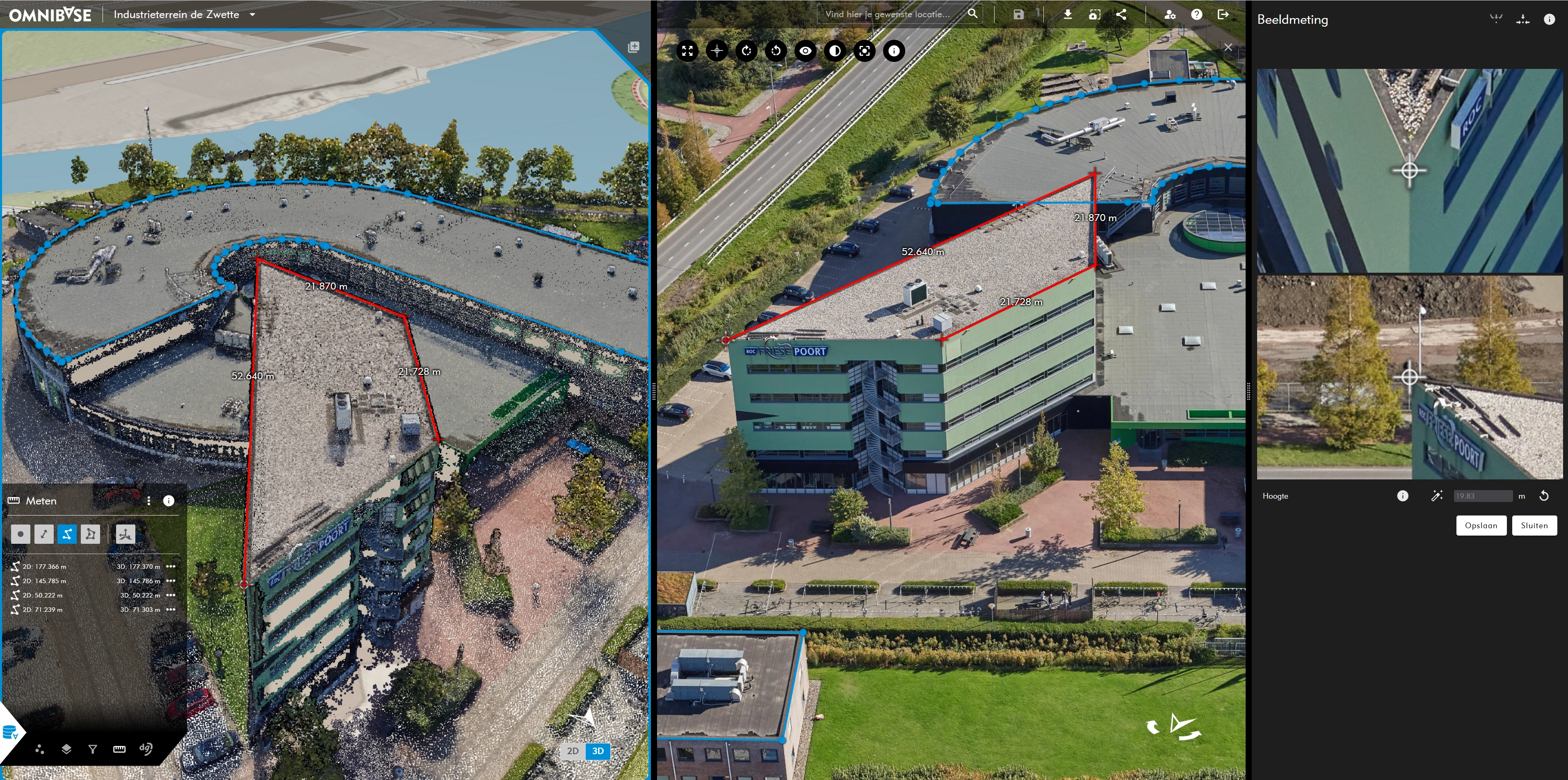
The following measurement options are available:
- Point.
- Distance.
- Polyline.
- Polygon.
Measurements can be snapped to each other (vertex-to-vertex), ensuring that geometries connect exactly.
Click one of the following links to go directly to measurements within Omnibase:
- Measurements in point clouds and 3D models.
- Measurements in Aerial imagery.
- Measurements in Panoramic images.
- Annotation measurements in data sources.
Click here for editing a measurement or editing an annotation.