Data and Project Management
Information
This menu is only available for users with the permissions: Admin or SuperUser.
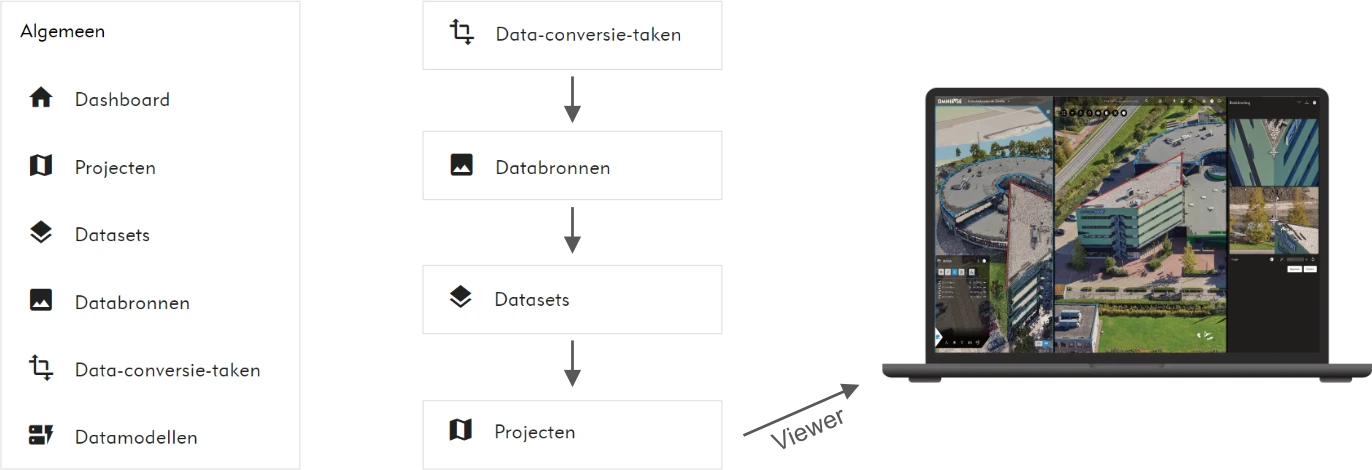
Within Data and Project Management, the following is described:
- How data is uploaded in data conversion tasks.
- How data is efficiently converted within data conversion tasks into cloud-optimized file formats.
- How the converted data, if required, is linked to additional metadata to create usable data sources.
- How relevant data sources are combined and bundled into a dataset.
- How data models are created and added within the annotation module of a project.
- How projects are configured based on datasets and other project-specific settings.
Tip
The steps described above are always executed in this order when new data is uploaded and added within Omnibase.
Time-consuming and complex pre-processing of raw data is not required; this process is handled efficiently and entirely within Omnibase.
Click on the sections below to navigate directly to the relevant page:
- Upload and convert data via the data conversion tasks menu.
- Create data sources via the data sources menu.
- Create datasets via the datasets menu.
- Create data models via the data models menu.
- Create projects via the projects menu.